
Ultimate WordPress SEO Checklist to Rank Higher on Google (2026)
Search engine optimization (SEO) remains one of the most important factors behind successful websites in 2026. With millions of websites competing for visibility on Google every day, simply publishing content is no longer enough. Even high-quality articles can struggle to rank if a website is not properly optimized for search engines.
WordPress SEO Checklist for Higher Rankings in 2026 (Complete Guide)
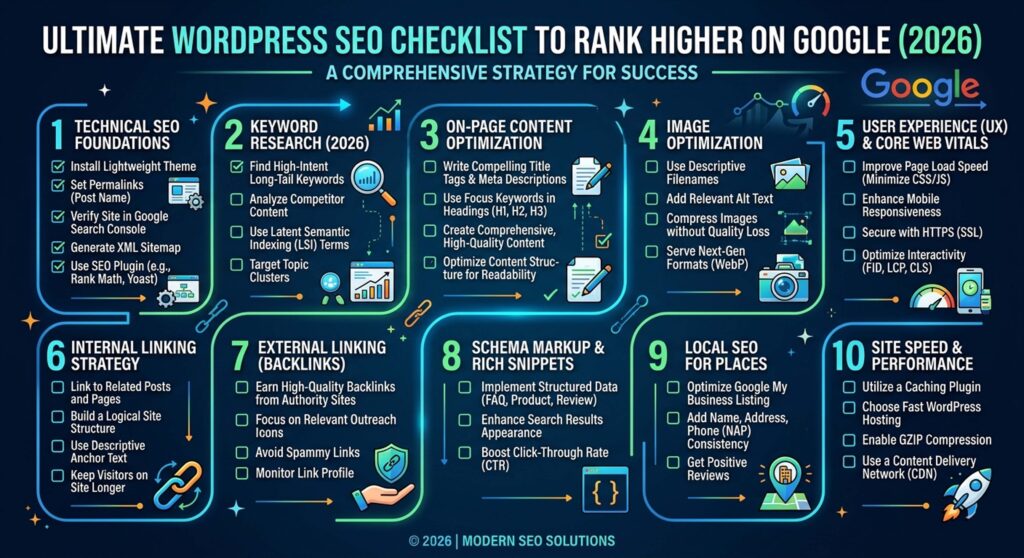
WordPress powers more than 40% of websites worldwide thanks to its flexibility, scalability, and SEO-friendly architecture. However, many website owners mistakenly believe that WordPress automatically handles SEO. While it provides a strong foundation, achieving higher rankings requires strategic optimization across technical SEO, content quality, user experience, and website performance.
This complete WordPress SEO checklist will help you improve search rankings, increase organic traffic, and build long-term visibility on Google in 2026 and beyond.
1. Choose the Right SEO-Friendly WordPress Setup
Before creating content, your website’s technical foundation must be optimized for performance and search engines.
A. Select a Fast Hosting Provider
Website speed directly impacts:
- Google rankings
- User experience
- Bounce rate
- Conversion rates
A slow website can cause visitors to leave before they even view your content.
What to Look For in a Hosting Provider
- SSD or NVMe storage
- Fast server response times
- Built-in caching
- High uptime guarantees
- Strong security features
Example: A website that loads in 2 seconds often outperforms a website that takes 6 seconds to load because users stay longer and engage more with the content.
B. Use a Lightweight WordPress Theme
Many premium themes include unnecessary features that slow down websites.
Choose a theme that offers:
- Responsive design
- Fast loading performance
- Clean coding structure
- SEO-friendly architecture
Avoid themes overloaded with animations, sliders, and features you don’t need.
2. Install an SEO Plugin
SEO plugins simplify technical optimization without requiring coding skills.
Best WordPress SEO Plugins in 2026
- Yoast SEO
- Rank Math
- All in One SEO
These plugins help manage:
- Meta titles
- Meta descriptions
- XML sitemaps
- Schema markup
- Canonical URLs
- Redirects
Using a reliable SEO plugin ensures your website follows modern SEO best practices.
3. Optimize Your Permalink Structure
Your URL structure plays a role in both rankings and user experience.
Poor URL Structure
yourwebsite.com/?p=123
SEO-Friendly URL Structure
yourwebsite.com/wordpress-seo-checklist
Why Optimized URLs Matter
- Easier for users to understand
- Better keyword relevance
- Improved click-through rates
- Enhanced crawling and indexing
Keep URLs short, descriptive, and keyword-focused.
4. Perform Proper Keyword Research
Keyword research is the foundation of every successful SEO strategy.
Understanding what people search for helps you create content that matches user needs and search intent.
A. Focus on Long-Tail Keywords
Long-tail keywords are easier to rank for and often attract more qualified visitors.
Example
Instead of targeting:
SEO
Target:
WordPress SEO checklist for beginners
Benefits include:
- Lower competition
- Higher conversion rates
- Better ranking opportunities
- More targeted traffic
B. Understand Search Intent
Google prioritizes content that satisfies user intent.
The primary types of search intent include:
- Informational
- Transactional
- Navigational
- Commercial Investigation
For blog content, informational intent is usually the most important.
5. Create High-Quality Content
Content remains the most important ranking factor in modern SEO.
Google’s algorithms increasingly prioritize:
- Expertise
- Experience
- Authority
- Trustworthiness
- Originality
A. Write Comprehensive Articles
Thin content rarely performs well in competitive search results.
High-ranking content typically includes:
- Clear explanations
- Practical examples
- Updated information
- Actionable advice
- Expert insights
Example: A detailed 1,500-word SEO guide generally performs better than a generic 300-word article that provides little value.
B. Use Proper Heading Structure
Headings help users and search engines understand your content.
Recommended structure:
- H1: Main title
- H2: Main sections
- H3: Subsections
Benefits include:
- Better readability
- Improved SEO
- Easier content scanning
C. Avoid Duplicate Content
Duplicate content can confuse search engines and dilute rankings.
Always:
- Publish original content
- Add unique perspectives
- Update outdated articles
- Avoid publishing copied material
6. Optimize On-Page SEO
On-page SEO helps search engines understand your content and its relevance.
A. Optimize Title Tags
An effective SEO title should:
- Include the target keyword
- Stay under 60 characters
- Encourage clicks
Example
WordPress SEO Checklist for Higher Rankings (2026 Guide)
B. Write Compelling Meta Descriptions
A strong meta description can improve click-through rates.
Example
“Complete WordPress SEO checklist for 2026. Learn how to improve rankings, increase traffic, and optimize your website step-by-step.”
C. Use Keywords Naturally
Avoid keyword stuffing.
Instead:
- Use keywords naturally
- Include semantic variations
- Write primarily for readers
Google now understands context better than ever.
7. Improve Website Speed
Website speed is a confirmed Google ranking factor.
A. Compress Images
Large image files can significantly slow down pages.
Best practices include:
- Using WebP format
- Compressing images
- Implementing lazy loading
B. Enable Caching
Caching improves loading speed by storing website data temporarily.
Popular caching plugins include:
- WP Rocket
- LiteSpeed Cache
- W3 Total Cache
C. Minimize Unnecessary Plugins
Too many plugins can:
- Slow down your website
- Create security vulnerabilities
- Cause compatibility issues
Only install plugins that provide real value.
8. Make Your Website Mobile-Friendly
Mobile devices generate the majority of internet traffic in 2026.
Google uses Mobile-First Indexing, meaning it primarily evaluates your mobile website when determining rankings.
Mobile Optimization Checklist
✔ Responsive design
✔ Fast mobile loading speed
✔ Readable fonts
✔ Easy navigation
✔ Mobile-friendly menus
A poor mobile experience can negatively affect rankings and conversions.
9. Build Internal Links
Internal links help distribute authority throughout your website.
Benefits include:
- Improved navigation
- Better user engagement
- Stronger topic relevance
- Enhanced crawling efficiency
For example, an article about SEO plugins should link to related content on keyword research, website speed, and content optimization.
10. Earn High-Quality Backlinks
Backlinks continue to be one of Google’s strongest ranking signals.
A backlink occurs when another website links to your content.
Effective Link Building Strategies
- Guest posting
- Publishing original research
- Creating comprehensive guides
- Building useful resources
- Outreach campaigns
Example: One backlink from a trusted technology website can provide more value than dozens of low-quality links.
11. Optimize Images for SEO
Image optimization improves both user experience and search visibility.
Best Practices
- Use descriptive filenames
- Add keyword-relevant ALT text
- Compress file sizes
- Use responsive images
Example
Instead of:
IMG001.jpg
Use:
wordpress-seo-checklist.jpg
12. Use Schema Markup
Schema markup helps search engines better understand your content.
Benefits include:
- Rich snippets
- Enhanced visibility
- Higher click-through rates
Common schema types include:
- Article Schema
- FAQ Schema
- Review Schema
- Product Schema
Structured data can significantly improve search appearance.
13. Submit an XML Sitemap to Google
An XML sitemap helps search engines discover and index your pages efficiently.
Most SEO plugins generate sitemaps automatically.
Submit your sitemap through:
- Google Search Console
- Bing Webmaster Tools
This ensures faster indexing of new content.
14. Monitor SEO Performance
SEO requires ongoing monitoring and optimization.
Key Metrics to Track
- Organic traffic
- Keyword rankings
- Bounce rate
- Conversion rate
- Page speed
- Click-through rate
Essential SEO Tools
- Google Search Console
- Google Analytics 4
- PageSpeed Insights
- Ahrefs
- SEMrush
Regular analysis helps identify opportunities for growth.
15. Update Old Content Regularly
Fresh content often performs better in search results.
Regularly update:
- Statistics
- Examples
- SEO strategies
- Internal links
- Outdated information
Content updates signal relevance and accuracy to search engines.
16. Focus on User Experience (UX)
Google increasingly rewards websites that provide exceptional user experiences.
Important UX factors include:
- Easy navigation
- Fast loading times
- Clear typography
- Helpful content
- Logical page structure
When users stay longer and engage more, rankings often improve.
17. Avoid Common SEO Mistakes
Avoid these common SEO errors:
❌ Keyword stuffing
❌ Slow website performance
❌ Duplicate content
❌ Poor mobile usability
❌ Broken links
❌ Spammy backlinks
❌ Ignoring technical SEO
These mistakes can significantly harm rankings and visibility.
Final SEO Checklist Summary
Before publishing content, ensure you have completed the following:
✔ Fast hosting provider
✔ SEO plugin installed
✔ Keyword research completed
✔ High-quality content created
✔ Mobile-friendly design
✔ Fast page loading speed
✔ Internal linking strategy
✔ Backlink acquisition plan
✔ Regular content updates
✔ User-focused website experience
Conclusion
WordPress offers powerful SEO capabilities, but success depends on how effectively you implement optimization strategies. In 2026, SEO is no longer just about keywords. It requires a combination of technical excellence, valuable content, strong user experience, and website authority.
By following this complete WordPress SEO checklist, you can improve rankings, increase organic traffic, and build a sustainable online presence. While results take time, consistent effort and ongoing optimization will help your WordPress website become a trusted authority in your niche and achieve long-term search engine success.
(FAQs)
1. Is WordPress good for SEO in 2026?
Yes, WordPress remains one of the best platforms for SEO in 2026. It offers clean code, mobile-friendly themes, SEO plugins, customizable URLs, and excellent content management features that help websites rank higher in search results.
2. Which SEO plugin is best for WordPress?
Some of the most popular WordPress SEO plugins in 2026 include Yoast SEO, Rank Math, and All in One SEO. Each plugin provides tools for optimizing meta tags, XML sitemaps, schema markup, and on-page SEO elements.
3. How important is website speed for SEO?
Website speed is a confirmed Google ranking factor. Faster websites provide a better user experience, reduce bounce rates, and increase the likelihood of higher rankings in search engine results pages (SERPs).
4. What are long-tail keywords in SEO?
Long-tail keywords are longer and more specific search phrases that typically have lower competition and higher conversion rates. For example, “WordPress SEO checklist for beginners” is a long-tail keyword compared to the broader keyword “SEO.”
5. Does mobile optimization affect WordPress SEO?
Yes. Google uses mobile-first indexing, meaning it primarily evaluates the mobile version of your website when determining rankings. A mobile-friendly website is essential for SEO success.
6. How often should I update my WordPress content?
Review and update important content every few months. Updating statistics, examples, links, and SEO information helps maintain relevance and can improve search rankings over time.
7. What is an XML sitemap in WordPress?
An XML sitemap is a file that lists your website’s important pages and posts. It helps search engines discover, crawl, and index your content more efficiently.
8. Are backlinks still important for SEO in 2026?
Yes. High-quality backlinks remain one of Google’s strongest ranking signals. Links from authoritative and relevant websites can significantly improve your website’s credibility and search visibility.
9. How many keywords should I use in a blog post?
There is no fixed number. Focus on one primary keyword and naturally include related keywords and semantic terms throughout the content. Avoid keyword stuffing, as it can negatively affect rankings.
10. How long does it take to see SEO results?
SEO is a long-term strategy. Depending on your competition, website authority, and optimization efforts, noticeable improvements can take anywhere from a few weeks to several months.